DNC-5000
Nuclias Hyper Controller for Managing Access Points and Switches (up to 2000 devices)
Description
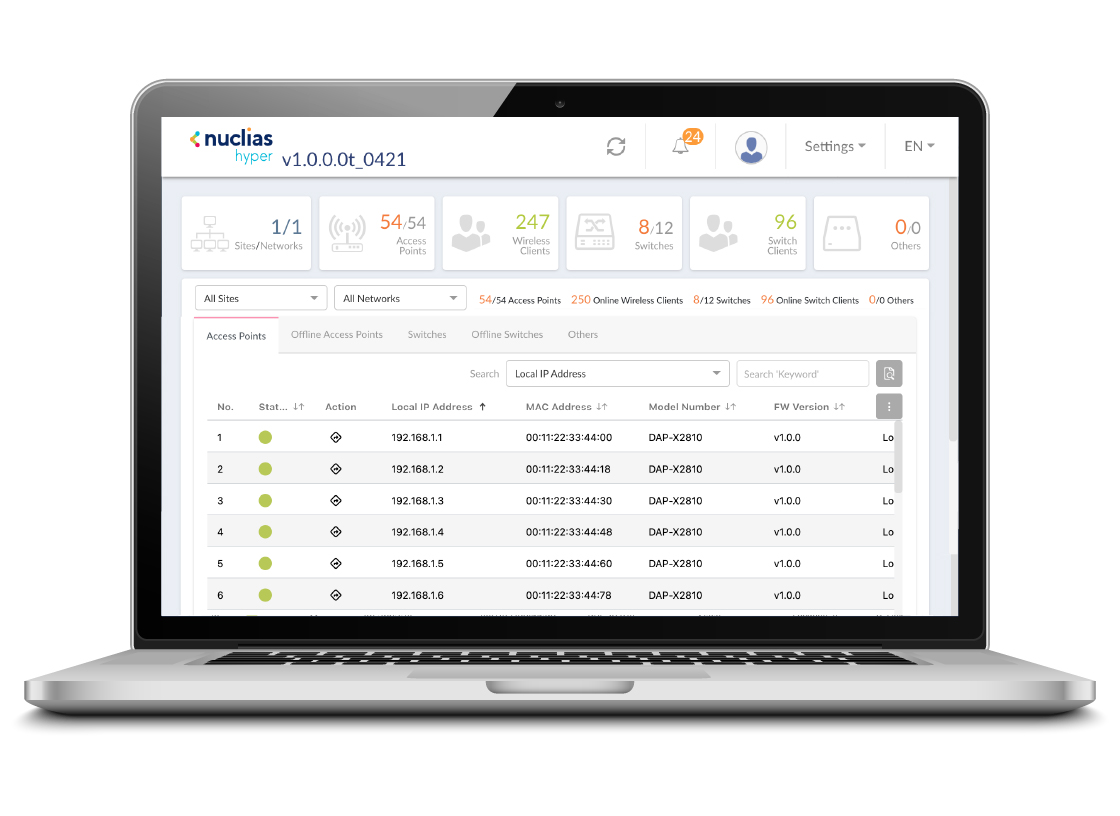
The DNC-5000 is a software network controller*, a smart network management platform to analyze, automate, configure, optimize, scale, and secure your network, delivering the convenience of an enterprise wide management solution. The DNC-5000 is a comprehensive network management platform designed to monitor and manage D-Link access points and switches.
Centralized Device Management
The DNC-5000 simplifies network administration by allowing administrators to manage up to 2000 APs and core/aggregation/edge switches from a single platform. This eliminates the need to access each device individually, saving time and reducing human error. Administrators can automate and schedule configurations, ensuring consistency across devices and reducing manual effort. For example, changes made to network settings or security policies can be deployed across multiple devices simultaneously, streamlining operations and ensuring uniformity. Additionally, firmware updates can be scheduled and applied to all devices at once, ensuring devices remain up-to-date and secure without interrupting network services. This approach not only increases efficiency but also enhances network security and performance, making it ideal for growing networks that require reliable, scalable management.
Role-Based Administration
Role-based administration is a cornerstone feature of DNC-5000, introducing a structured approach to network management. This functionality allows for the delineation of user roles and permissions, enabling a tailored administrative experience and enhancing network security by ensuring that users only access the features necessary for their role.
Traffic Reporting and Analytics
Provides advanced traffic reporting and analytics features, helping administrators gain deep insights into network usage. Through realtime data visualization, administrators can clearly see traffic trends, device usage, and potential bottlenecks. These detailed insights help identify network efficiency issues and optimize performance, ensuring the best allocation of resources. Customizable reports allow administrators to generate precise data based on different needs, enabling more effective network upgrade planning and strategy adjustments.
Real-Time Monitoring and Alerts
Enable administrators to continuously track network health, performance, and usage from a centralized dashboard. This provides a comprehensive view of network activity, allowing for quick identification of potential issues before they impact operations. Instant alerts notify administrators of anomalies or changes, facilitating prompt responses to mitigate risks and maintain network integrity. Detailed performance reports provide valuable insights into network traffic, device status, and overall efficiency, helping to optimize resource allocation and prevent downtime. By monitoring in real-time, administrators can ensure that the network is functioning at its best, while minimizing the risk of disruptions, enhancing security, and improving overall operational efficiency.
VLAN and Access Control
Offers robust network segmentation and security features, allowing administrators to control access to different parts of the network. VLAN enables the logical division of networks, improving efficiency and reducing congestion by isolating traffic. With advanced access control features, administrators can define which SSID has access to specific network resources based on roles, ensuring only authorized users can access sensitive data or critical systems. In addition, VLANs allow for easier management of network traffic, helping to prioritize important traffic and optimize bandwidth usage.
Auto-RF Management and Bandwidth Optimization
Improve wireless performance by automatically adjusting radio frequency (RF) settings such as channel selection and power levels. This ensures optimal wireless coverage, minimizes interference, and maximizes network stability. The system dynamically monitors the wireless environment and makes real-time adjustments, adapting to changing conditions and traffic demands. Bandwidth optimization ensures that resources are allocated efficiently, prioritizing critical applications and preventing network congestion. This combination of RF management and bandwidth allocation enhances user experience by delivering consistent and reliable connectivity, even in dense environments with multiple devices.
Multi-SSID and Captive Portal Authentication
Allow administrators to create multiple, isolated networks within the same infrastructure, tailoring each network for specific user groups such as employees, guests, or partners. This feature improves network security by segmenting traffic and ensuring that each group only has access to the resources they need. The Captive Portal Authentication provides secure and customizable login options for both guests and employees, offering flexibility in access methods such as username/password, click through, or passcode. This enhances security by ensuring that unauthorized users cannot easily access sensitive parts of the network.
Centralized Firmware Upgrade
Nuclias Hyper includes 2 platforms• Nuclias Connect and NMS (SNMP Managed System). The Nuclias Connect platform provides management/monitoring of access points and wireless clients, switches and wired clients. The NMS platform provides the ability to analyze and manage devices that support the SNMP protocol. Administrators can efficiently manage and deploy firmware updates across multiple devices from a single platform. This feature eliminates the need for manual updates on each device. Administrators can updates at convenient times, minimizing network downtime and ensuring that all devices are running the latest security patches and performance improvements.
*This software is not commercial and is provided in its current form with limited technical support. By agreeing to these terms of use, the user accepts the possible discrepancy between the expected and actual results.
General features
System Requirements
Large Scale Install (up to 2000 Devices) / Small Scale Install (up to 100 Devices)
CPU
• Intel 12th i7 or later /• Intel 12th i5 or later
RAM
• 32G /• 16G
Storage
• 4TB /• 1TB
Ethernet NIC
• Gigabit Ethernet Card
Monitor Resolution
• 1080P
Platform
• Windows Server 2019 (64-bit)1 /• Windows 11 Pro (64-bit)1
• Linux Ubuntu (22.04 or above) /• Linux Ubuntu (22.04 or above)
Browser for Nuclias Hyper Management
• Edge, Chrome and Safari
Nuclias Hyper2 Features
Dashboard
• Displays network status summary and device list.
• Network Status
• Alert Notification
• Device List-Access Point
• Device List-Offline Access Point
• Device List-Switch
• Device List-Offline Switch
• Device List-Others
User Management
• List users and user privileges; create user for system management
• User Level:
- Manager
- User
• User Privilege (NMS):
- Org Admin
- Site Admin
- Network Admin
- Network Local User
• User Privilege (Nuclias Connect):
- Root Admin
- Root User
- Local Admin
- Local User
- Front Desk User
Log
• Displays all audit and alert logs
System Backup & Restore
• Backup and restore configuration of Nuclias Hyper, which includes user management settings, SSL certificate management settings, and SMTP settings
SSL Certificate Management
• The SSL certificate is self-signed at default settings, it also allows auto signing by third-party Certbot
• Certificate Validity Period
• Upload Certificate
- Manually
- Certbot Automatically
• Upload Certificate From File
• Upload Key From File
SMTP Settings
• Configure SMTP server settings. Nuclias Hyper will send password reset email if password is forgotten
- SMTP Server address
- Port
- Sender E-Mail Address
- Sender
- Security Type
- Encoding Type
- Authentication
- Test E-Mail
NMS Features
Dashboard
• Analysis
• Overview
• Switch
• Host
Monitor
• Network Discovery
• Device View
• Interface View
• Topology Map
• Connection View
• Rack View
• sFlow Analyzer
• Device Group
Configuration
• Batch Configuration
• Task Management
• Firmware Management
• Configuration Management
• File Management
Alarms and Notifications
• Alarm
• Trap & Syslog
• Trap & Syslog Editor
• Monitor & Alarm Settings
• Notification Center
Templates
• Device Template
• Device Support
• Panel Template
• Monitor Template
• Configuration Template
Report
• General Reports
• Scheduled Reports
• My Reports
Tools
• ICMP Ping
• SNMP Test
• Trace Route
• CLI
• File Comparison
System
• Basic Settings
• Scheduling
• Server Management
• NMS Log
• About
Nuclias Connect Features
Device Management
• Device discovery (L2/L3)
• Centralized management and grouping of devices based on profiles
• Group firmware/software updates
• Scheduled firmware/software updates and configuration deployment
• AP LED on/off control
Monitoring
• Dashboard
• Topology and floor plan visualization
• Reporting system
• Logging system
• Event notifications, including email alerts
Wireless Features Management
• Bandwidth Optimization
• Auto RF Management:
- Automatic Transmit Power Control (TPC)
- Automatic Channel Selection (ACS)
• Time-based Wireless Operation
• IGMP Snooping
• VLAN
• Wireless Client Isolation
• Multi-SSID
• Band Steering
• Fast Roaming (only with APs supporting Fast Roaming)
• Airtime Fairness
Security Features Management
• 802.1X
• Port Authentication
- Local Database (username/password)
- POP3 Server
- RADIUS Server
- LDAP Server
- PIN Code Authentication
- MAC Address Authentication
• MAC-based/IP-based ACLs
• Wireless Client Isolation
Network Management
• Backup and restore
Supported Devices
Wireless Access Points
• DAP-2620
• DAP-2622
• DAP-X2850
• DAP-3666
• DAP-X3060
• DAP-X3060OU
• DAP-2695
Switches
• DGS-1100-05V2
• DGS-1100-08PV2
• DGS-1100-08V2
• DGS-1100-10MPV2
• DGS-1100-10MPPV2
• DGS-1100-16V2
• DGS-1100-18PV2
• DGS-1100-24PV2
• DGS-1100-24V2
• DGS-1100-26MPV2
• DGS-1100-26MPPV2
• DGS-1210-10
• DGS-1210-10MP
• DGS-1210-10P
• DGS-1210-20
• DGS-1210-26
• DGS-1210-28
• DGS-1210-28MP
• DGS-1210-28P
• DGS-1210-52
• DGS-1210-52MP
• DGS-1210-08P
• DGS-1210-16
• DXS-1210-28T
• DXS-1210-28S
• DXS-1210-10TS
• DXS-1210-12SC
• DXS-1210-12TC
• DXS-1210-16TC
• DGS-1250-28X
• DGS-1250-28XMP
• DGS-1250-52X
• DGS-1250-52XMP
• DMS-1250-10S
• DMS-1250-10SP
• DMS-1250-10SPL
• DMS-1250-12TP
• DGS-1510-28X
• DGS-1510-28XMP
• DGS-1510-28P
• DGS-1510-52X
• DGS-1510-52XMP
• DGS-1520-28
• DGS-1520-28MP
• DGS-1520-52
• DGS-1520-52MP
• DGS-3130-30S
• DGS-3130-30PS
• DGS-3130-30TS
• DGS-3130-54PS
• DGS-3130-54S/B
• DGS-3130-54TS
• DMS-3130-30PS
• DMS-3130-30TS
• DXS-3130-28
• DXS-3130-28P
• DXS-3130-32S
• DXS-3410-32XY
• DXS-3410-32SY
• DGS-3630-28PC
• DGS-3630-28SC
• DGS-3630-28TC
• DGS-3630-52TC
• DGS-3630-52PC
• DXS-3610-54S
• DXS-3610-54T
1Nuclias Hyper is a Linux-based solution delivered as a Docker container, enabling full compatibility with Docker on Windows.
2Nuclias Hyper is a management portal that controls two subsystems, Nuclias Connect and NMS for device management.
Certificates
Order info
|
DNC-5000
|
Nuclias Hyper Controller for Managing Access Points and Switches (up to 2000 devices)
|
Pictures
DNC-5000/A